
VibeBasic is a curious little project I have been playing with, and I wanted to share it. It is a clone of Visual Basic 6, with the grey Windows 98 look, and it runs on macOS, Windows and Linux.
I missed how easy VB6 made small programs. You drew a window, double-clicked a button, typed a few lines of BASIC and pressed F5. I wondered what that would feel like on a computer today, so I tried building it.
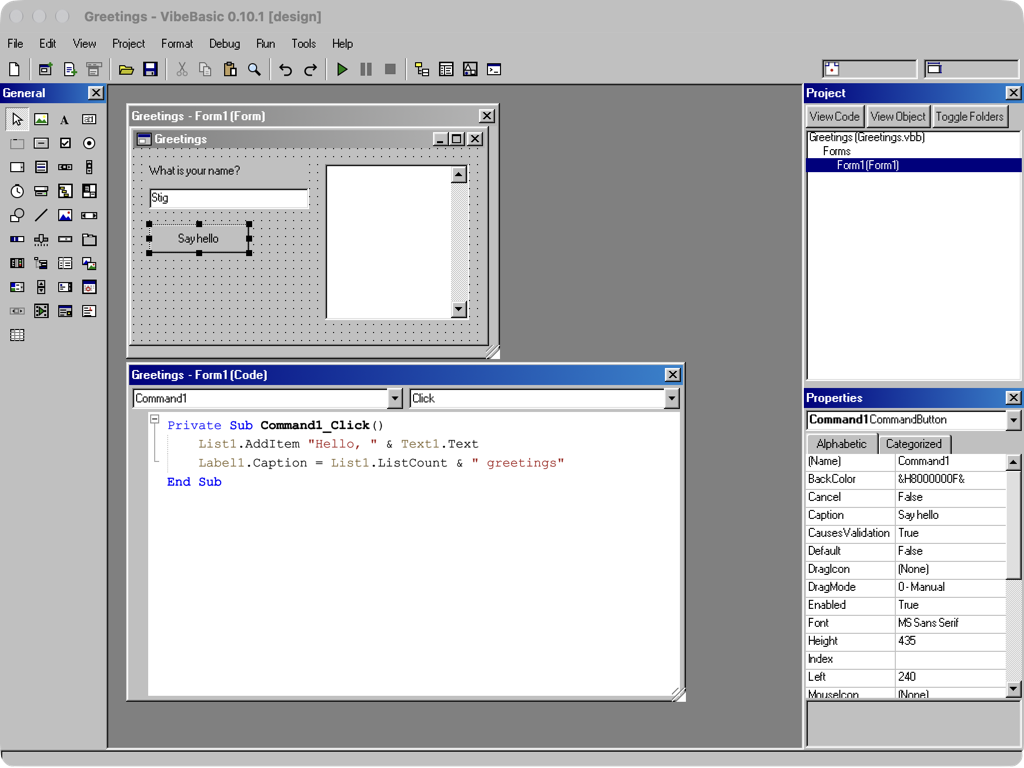
What it does
VibeBasic looks and works like VB6 did in 1998: the Toolbox on the left, the form in the middle, the Project Explorer and Properties window on the right.
- Form designer. Drag controls onto a form, set their properties, and double-click to write the event code.
- The VB6 language. Subs and functions,
On Error,MsgBox, class modules, file I/O and the rest of the familiar BASIC. - Run and debug. F5 runs the program in its own windows, with breakpoints, stepping and the Immediate window, and the old “Run-time error ’13’: Type mismatch” dialog.
- The controls you may remember. TreeView, ListView, MSFlexGrid, Winsock, the Data control and even Microsoft Agent, with characters of its own.
- Make app. File > Make turns a project into a small program you can give to someone else.
It does not run real ActiveX .ocx files or VB6 .exe files. Everything runs in VibeBasic’s own interpreter, and Declare (calling DLLs) is not supported yet.
How it is made
I made it together with Claude Code, and the name is a nod to vibe coding. It is a Tauri app: the IDE, the BASIC interpreter and the controls are written in TypeScript, with a little Rust for files, serial ports and printing.
The Windows 98 look comes from 98.css, and the code window uses CodeMirror. The icons and Agent characters are drawn from scratch.
A small AI helper
One thing VB6 never had: an AI assistant. It connects to a model you run yourself, through any OpenAI-compatible server such as Ollama or vLLM. I use a Qwen model on another PC on my network.
- Ask AI (Ctrl+I) writes code in the code window, or lays out controls on a form.
- Ask AI in the error dialog suggests a fix for the line that failed.
- Every suggestion is a preview. You can change it or say no, and it is applied as one undo step.
It is only as good as the model behind it, and it still gets things wrong.
Try it
VibeBasic is free, and the source is on GitHub. The latest release has builds for macOS on Apple Silicon, Windows 10 and 11, and Linux (.deb and AppImage).
The apps are not signed yet, so the first start takes one extra click: Open Anyway on macOS, More info > Run anyway on Windows. For the AI, point Tools > Options > AI at your Ollama or vLLM server and press Test Connection.
It is a hobby project and a work in progress. Still missing: Declare, UserControls, the OLE container and DDE. If you ever drew a form, double-clicked a button and pressed F5, I would love to hear what you build with it.