 FuCode
Your models. Your code. Your desktop.
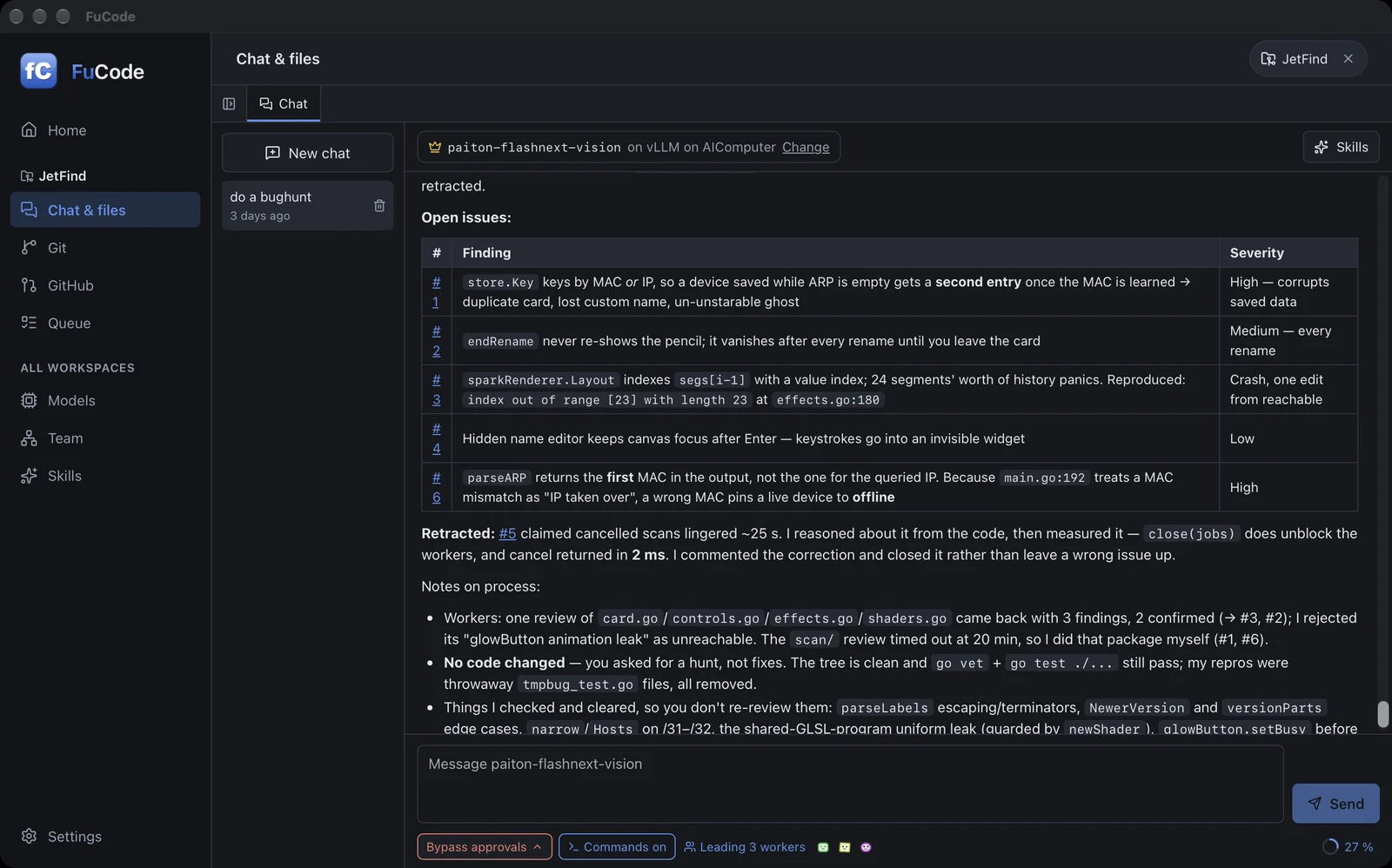
Point FuCode at LM Studio, Ollama, llama.cpp or vLLM, on this computer or another one at home. Chat about a project, let the model edit files and run the tests, or give one model a team of others to hand work to.
Version 0.3.3
— downloads— visitorscounted once the page is on stigern.net
FuCode itself is free and has no account. You bring the model: a server you run, such as LM Studio or Ollama, or an OpenAI-compatible endpoint. The Mac app is signed and notarized by Apple. The Windows and Linux builds are not signed yet, so Windows asks once before the first start (see below).
macOS
macOS 11 or later, Apple silicon and Intel. Signed and notarized: open the disk image and drag FuCode to Applications.FuCode_0.3.3_universal.dmg20.8 MBWindows
Windows 10 or 11, 64-bit. Installs for your own user and fetches the WebView2 runtime if it is missing.FuCode_0.3.3_x64-setup.exe7.8 MBWindows, as an MSI
For installing with the usual Windows tools. Otherwise the same.FuCode_0.3.3_x64_en-US.msi10.8 MBLinux AppImage · 0.3.0
x86-64. Needs WebKitGTK 4.1 from your distribution. 0.3.3 has no Linux build yet.FuCode_0.3.0_amd64.AppImage95.5 MBDebian and Ubuntu · 0.3.0
The packagefu-code, which pulls in WebKitGTK, GTK 3 and Git.FuCode_0.3.0_amd64.deb10.5 MBSHA-256 checksums
924a509c9535114a13baa66b1352f5c9b11a33e25f4ac155494f028ae38481ca FuCode_0.3.3_universal.dmgc4196e99ef3bcf86572953f5d2bbc9e83c03c4ad6cc7938c479599dc2b80b0ca FuCode_0.3.3_universal.app.zipc5a06fe68c85f6e5200ff5857408ac925b8c13cfdeea00c745ec2df127210bc3 FuCode_0.3.3_x64-setup.exe57989497d9f693fb3c5e7472ea839e2237a61b135e04c064fc43281173111798 FuCode_0.3.3_x64_en-US.msi3d5ae9a6feb473e044bbce805aca48f8b930e21245d7e95b8fd334c75917e427 FuCode_0.3.0_amd64.AppImage0cfafa68a3a4b5de2a07f834e765b253c09b6a7fc90a98ea3b4542ebdb78d25a FuCode_0.3.0_amd64.deb3c74d72e89e4305bd7069e33e384602edb98068f6f26b7b53b75345cddc58bdf FuCode-0.3.0-1.x86_64.rpmWindows: the first start
SmartScreen says Windows protected your PC; choose More info, then Run anyway. The Mac app opens without asking: it is signed and notarized by Apple.
Linux
Make the AppImage executable first.
chmod +x FuCode_*.AppImageFree. What changed is in the changelog below. If it saves you a subscription, you can buy me a coffee.
☕ Buy me a coffeeOpen a folder, connect a model, ask.
Open a project folder
From Home. FuCode only reads it until you allow more, and each folder keeps its own chats, queue and Git state.
Scan for your model servers
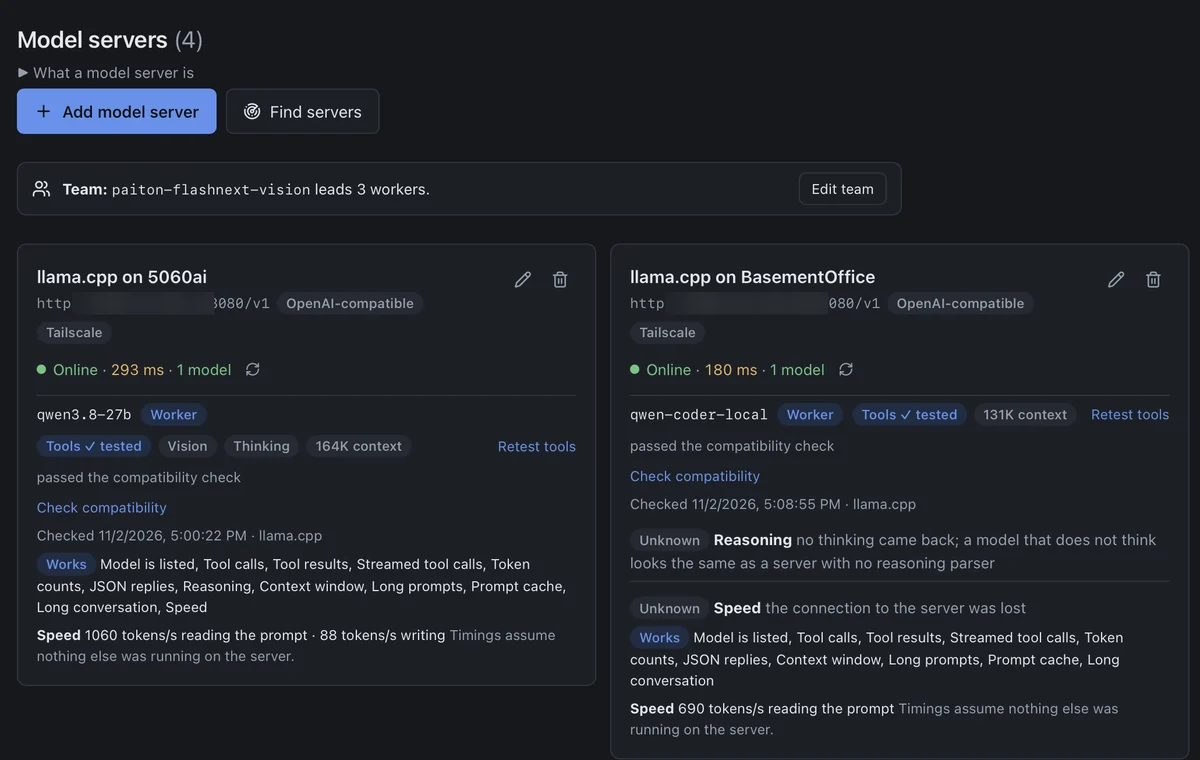
Models finds LM Studio, Ollama, vLLM and llama.cpp on this computer, your local network or your Tailscale machines. Test tools checks that a model can do the work; a twelve-step check says what to change on the server when it can't.
Chat in the workspace
The model reads files, searches, edits and runs tests, as far as the chat's Mode allows. Start with /brainstorm to agree on a design before any code is written.
Any model you can reach
OpenAI-compatible servers and Ollama, at home or at a remote endpoint. API keys and GitHub tokens go in the system keychain. Prompts and file contents go to the server you choose and nowhere else; FuCode has no server of its own.
AGENTS.md or CLAUDE.md in the project goes into every chat as the project's rules, and Superpowers-compatible SKILL.md packs install with one click.
You choose, per chat, what the model may do.
The Mode sits under the message box and can be changed in the middle of a reply; lowering it takes effect at once. Every action is logged.
Edits show as a diff before they are saved, and a file changed on disk in the meantime is never overwritten without a word. Long chats show how full the model's context is and are compacted by themselves.
Git is built in: stage, commit and switch branches offline. Link the folder to GitHub to read issues, start work on one in its own branch and open a pull request after seeing exactly what will be pushed.
One model leads, the others take the small jobs.
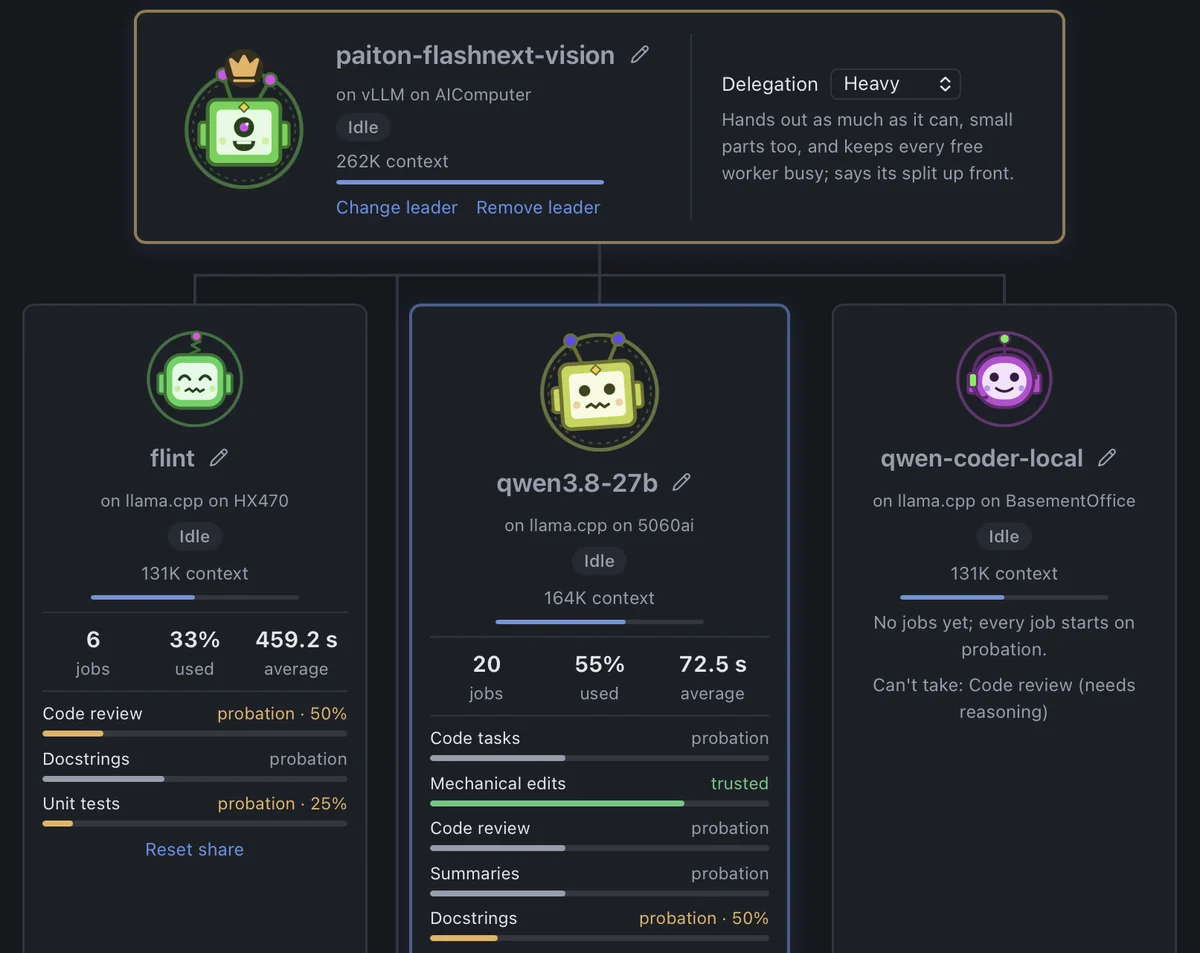
Pick a leader and add workers from any of your servers. The leader hands them well-defined jobs: summaries, finding usages, docstrings, unit tests, mechanical edits, reviews, commit messages. FuCode picks a free worker that can do it, checks the result and keeps a trust record for each job type.
Workers never run commands, and change files themselves only if you switch that on for them. In 0.3.3 the page shows the work as it happens: the line to a busy worker lights up, and its card flashes when the job is done.
Line up tasks and let them run one after another.
Each workspace has its own queue. Drag tasks into order, pin one to run next, and add dependencies. The next task starts as soon as the leader is free; pause and resume between steps. The running task shows live, with its time and a light per busy worker.
The queue survives a restart, and after a crash a half-done task is marked as interrupted, never quietly run again. You see what it changed and decide.
Small, and tested on real local models.
Local first, and careful with your machine.
Your files and tasks stay on your computer unless you send them to a model. Nothing is sent to me, and FuCode finds models on your own networks only, never across the internet.
- Commands run without a shell, and stay inside the project folder unless you turn that off in Settings. Git options are allow-listed.
- Files that may hold secrets are kept out of the model's reads and diffs, and out of commits: Stage all skips them, and committing one asks by name. Best effort, and said so.
- Opening a folder can't run programs: hooks, filters and helpers named in a repository's own config are ignored.
- A pull request confirms where it really goes, and what is pushed.
- Remote access from your phone is off by default, listens on your Tailscale address only, and lets in only devices signed in as you.
- A crash offers its report on the next start, to read yourself. Nothing is sent anywhere.
Made with Claude, for my own local models, shared as is.
I wrote FuCode because I wanted a coding app for the models I run at home, on my own machines, without anything in between. The code was written with Claude, and FuCode is its own program: it is not a fork of OpenCode and uses none of its code. I take no responsibility for what it does on your machines: no warranty, no support promise. I use it with my own models and it works for me, and that is the only reason it is here. If it does the same for you, good.
What changed in each version.
Version 0.3.3
2026-11-02
A release about the look of the app: less empty space, less explanation that is always on, and more of what is happening right now. Built for macOS (universal) and Windows.
New
- Team page shows work in motion. The line from the leader to each worker with a job lights up, with dashes running down it. Working cards glow, and a card flashes green once when its job ends.
- Trust as bars on the Team page. Each job type has a bar for how far up the trust ladder the worker is, shortened by a cut share. Each card also has a context bar, measured against the team's largest model, and workers show three figures: jobs, share used by the leader, and average time.
- A wider Team page. The leader's card lies wide, about a third of its old height, and rows hold three workers where three fit.
- Home shows what is going on. Once a server is set up, a column beside your projects shows servers, the team and who is working, the queue, and the latest chats.
- Queue shows the running task once, live, with elapsed time and one light per worker that has a job. On wide windows it sits beside the rest of the queue.
- Explanations fold away. Team, Models, Queue, Skills and GitHub show their explanation until the page is in use, then behind one line.
- Models: two servers or more sit side by side; answer time is coloured by speed; a server that doesn't answer has a Try again button.
- GitHub: being signed in is one line, and the newest issue opens at once.
Fixed
- Queue rows no longer read "Next · · commands off" when a task's mode isn't recognised.
Known issues
- No Linux packages in this release. For Linux, use v0.3.0.
- The Windows packages are unsigned, so SmartScreen asks before the first start. The Mac packages are signed and notarized by Apple (replaced on 2026-11-03; the first upload was unsigned).
Version 0.3.2
2026-11-02
Windows packages built from the fixes found by testing the real app on Windows, macOS and local models, and checked by hand on Windows 11, installer included. Every step of the checks passes on Windows and macOS.
New
- Model compatibility check. A button on the Models page checks a model in twelve steps, among them tool calls, streamed tool calls, context window, prefix cache and speed. It gives a fix for each missing item, worded for vLLM, llama.cpp, Ollama or LM Studio. It only reports and changes nothing on the server.
- A reply shows how far it has come before its first text: Sending, Sent, Reading 43% (95% from cache), Read. On llama.cpp the percent comes from the server.
- Project rules.
AGENTS.md, or elseCLAUDE.md, in the workspace root goes into the system prompt of every chat with file access. - Better workspace search for the model, with regex, globs, context lines and a result limit, so it no longer falls back to grep.
- Team jobs can take part of a file as input when the worker only reads it, so a large file no longer has to be refused.
- Long chats open at their end and load older messages as you scroll up.
- Screen readers hear a finished reply, a failure or an approval request, but not the tokens as they stream. Checked with Narrator.
Fixed
- One folder is one workspace, however it is spelled, such as
D:\xand\\localhost\D$\x. Two chats can no longer change the same files at once through two spellings. - **Windows: a stopped commit no longer leaves
.git/index.lock** behind to block every later commit. - **Windows: files named
con,aux.corCOM1can't be created**, since Windows tools can then neither open nor delete them. - Windows: a project folder over about 258 characters gets a message saying the path is too long, instead of "The directory name is invalid".
- A slow server no longer fails a reply at 5 minutes when it sends progress or keep-alive lines before the first text.
- Stopping a reply before any text no longer makes the model write it again on the next question.
- A long chat opened after a chat switch no longer stops 200 messages short of its end.
- A reply in Plan works while another chat changes the workspace, and the busy message points to Plan.
- Moving a chat to the team leader is announced in the header before the next message moves it.
- LFS files from another server stay pointers. Connecting or switching branch no longer downloads LFS objects from a
.lfsconfigaddress that isn't the origin's, and the app says so. - **An absolute path such as
/workspace/src/a.rs** is still refused, and the refusal now namessrc/a.rs. - **macOS no longer makes a single-instance socket in
/tmp.**
Known issues
- This release has Windows packages only. For macOS and Linux, use v0.3.0.
- The Windows packages are unsigned, so SmartScreen asks before the first start.
Version 0.3.1
2026-10-31
The first Windows packages of the 0.3 series. The checks and tests now run and pass on Windows.
Fixed
- Keeping commands in the project folder on Windows. With the app and the project on different drives, a path fused to a short flag, such as
curl -sT/Windows/x, could pass the check. It is now looked for on the project's drive.
Known issues
- The Windows packages are unsigned, and have not had the hands-on release checks. See #273.
Older versions
0.3.0
Version 0.3.0
2026-10-31
This release comes from three rounds of bug hunting, the last on the real app with real chat and Team workloads on local models. It closes 87 issues.
The builds are unsigned, so your system asks you to confirm the first time you open FuCode (see INSTALL.md).
New
- Context ring and compaction. The chat shows how full the model's context is and compacts long chats by itself, recovering when a request doesn't fit.
- Direct workers. A worker you trust can change files itself, with "Can change files directly" on the Team page.
- Workers are probed for reasoning their servers don't report.
- Linking a repository connects the folder to it on the GitHub page.
- Works at every window size. Chat stays usable from 320 to 1920 px wide, with the file panel open or closed, and the Git and GitHub pages fit a phone.
- Remote page reloads keep the reply so far, and the page resyncs by itself after a dropped connection.
- Second launch raises the running window instead of starting a second copy.
- Long messages warn before sending, and say what would be left out of the middle.
- A model can read a range of a file of any size, and search says what it skipped.
Safer
- A folder can't run programs by opening it. Plain files no longer count as a repository. Filters, signing programs, credential helpers, proxies, TLS settings and other programs named in a repository's own config, or a submodule's, no longer apply to
git status, diff, push or fetch. - Lowering a chat's Mode during a reply lowers its access at once.
- A tighter guard and Auto. Git options are allow-listed, more argument forms are refused, and
sedandawkscripts are read and checked. Auto asks for flags that name a program or write elsewhere, and before Git prints a tracked secret. - Secrets stay out of commits. Stage all skips files that may hold secrets, and committing one asks by name.
- Pushes go where the confirmation says. A pull request confirms the real destination, and an LFS upload is refused if
.lfsconfigpoints anywhere else. - Remote access is tighter. A reply can't leak data through an image, and only your own Tailscale devices connect, not other programs on the host computer.
- **Model traffic ignores
HTTP_PROXY**, so a proxy never sees keys or prompts.
More dependable AI runs
- A busy server is waited for instead of failing a reply at 5 minutes. A single-slot server can take its time, and the chat says what is happening.
- A dropped connection says so, and a task retries it when nothing in the workspace changed.
- A reply cut off by a limit or a server error is no longer recorded as finished.
- FuCode's own notices are never sent to the model as if it had said them.
- A message queued during a reply is never silently dropped.
- A model that repeats itself is stopped. Tool results that don't fit are cut rather than ending the reply.
- Queue retries no longer repeat work silently.
- Team: a silent server no longer costs a worker its share, a correct "nothing to change" isn't penalised, offline workers don't stall a step, and direct workers can't overwrite changes they never saw.
Faster
- Deleting a chat no longer freezes the window on a large database, and startup no longer scans whole tables.
- Streaming doesn't re-render the whole chat, and big folders load in pages in the Explorer.
Fixed
- Failures no longer look like success. A chat, page or menu that can't load says so and offers Retry, and Stop and Delete report errors.
- The editor handles a file changed or deleted on disk without losing your edits.
- Reloading stays on the page you were on, and the Mode picker works from the keyboard.
- One tap on the Home trash icon no longer deletes a workspace's chats; it asks first.
- Bypass approved for one chat no longer carries over to the next.
- A problem with the database at startup shows a message instead of crashing silently.
- Many smaller fixes across discovery, providers, skills, crash reports and the release script.
Changes you may notice
- FuCode's own push and branch switch no longer run your
pre-pushandpost-checkouthooks. Commit hooks still run, and Git LFS objects are uploaded by FuCode. - A proxy or TLS setting in a repository's own config is ignored on push and fetch. Put it in your global Git config.
- A pull request needs
originto be on GitHub. - A provider that can only be reached through a proxy no longer works.
- The remote URL no longer opens from a browser on the host computer itself.
- Auto asks more often for commands with unusual flags. Tasks pause after 200 steps when no step limit is set.
gawk -iandgawk -lare refused unless the file is in the project.
Upgrading
Known issues
- Windows has not been run with this release's changes. See #273 for this and what else is untested.
Versions before 0.3.0 were early test builds for the Mac.