 VisualVibe
Draw the window. Write the Python. Ask your own model.
VisualVibe is a desktop IDE in the spirit of classic Visual Basic, for Python and Qt. Drag controls onto a form, write the code behind them, run and debug it, and let a model you run yourself help with the rest.
If you like VisualVibe, please consider supporting further development.
☕ Support me on Ko-fi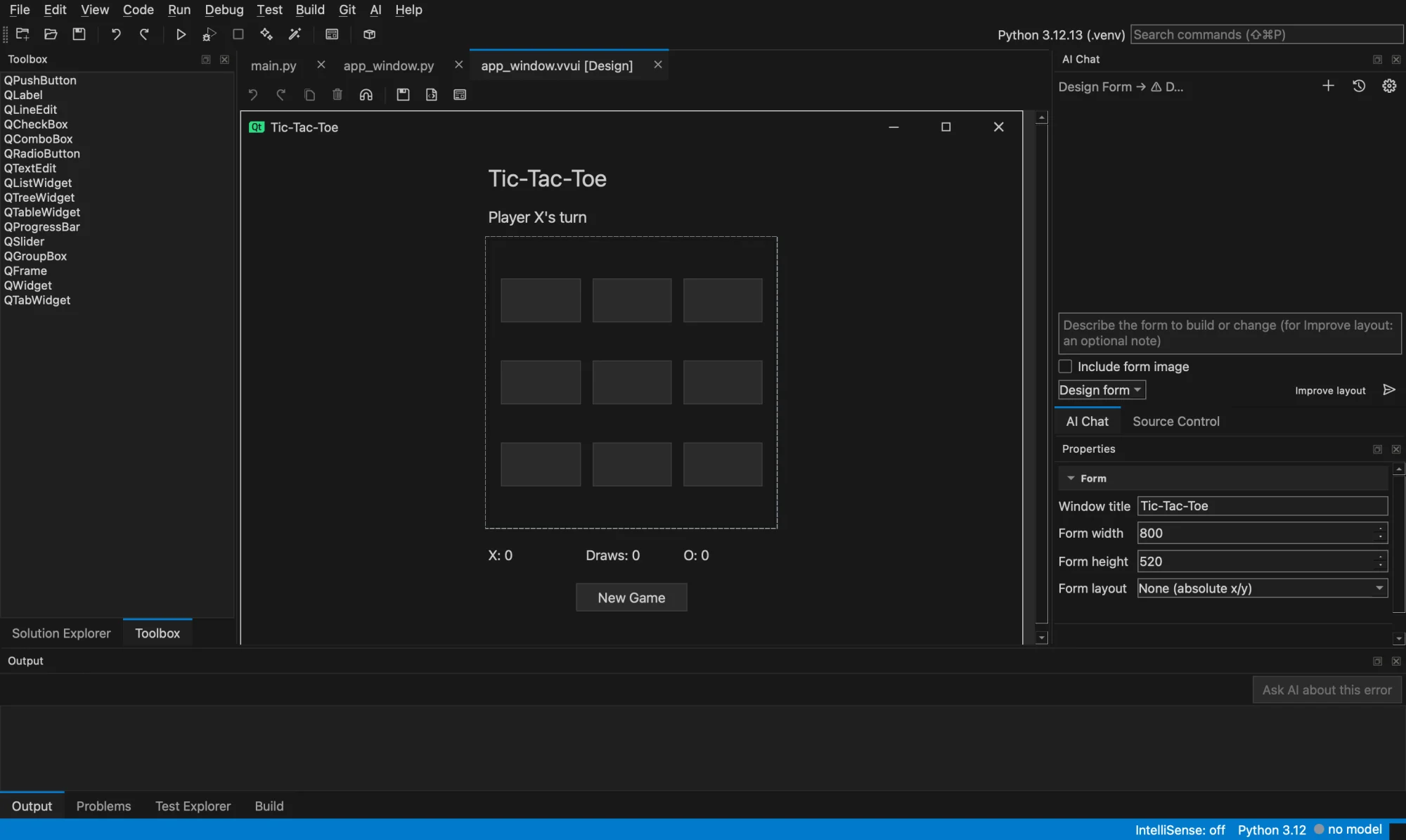
Version 0.8.1
— downloads— visitorscounted once the page is on stigern.net
VisualVibe is free and has no account. It is in early development: things still change between versions, and so far it is only built and tested on a Mac with Apple silicon. Your programs run with a Python installed on your computer, and the AI features need a model server you run, such as LM Studio or Ollama.
macOS
macOS 14.4 or later, Apple silicon. Open the disk image and drag VisualVibe to Applications. Not signed yet: see the first start below.VisualVibe-0.8.1-macos-arm64.dmg43.0 MBmacOS, as a zip
The same app, without the disk image.VisualVibe-0.8.1-macos-arm64.zip37.5 MBSHA-256 checksums
2bc147132ba689d4b359affbef6047da08c1690575122115f6962524db4d6082 VisualVibe-0.8.1-macos-arm64.dmg4a581f26e18c878c74b79eb837eef286a9294cac5e4ee0c1a250afaea0310348 VisualVibe-0.8.1-macos-arm64.zipCheck a download with shasum -a 256 followed by the file name. The list is also here as a file: SHA256SUMS.
Mac: the first start
The app is not signed by Apple yet, so macOS refuses to open it the first time. Open System Settings, go to Privacy & Security and choose Open Anyway. After that it starts as usual.
Windows, Linux and Intel Macs
VisualVibe is written to run there too, but those builds are not tested yet, so there is nothing to download for them. They come when they have been tested.
Free. What changed is in the changelog below. If you find it useful, you can support me on Ko-fi.
☕ Support me on Ko-fiStart a project, draw a form, press run.
Start a project
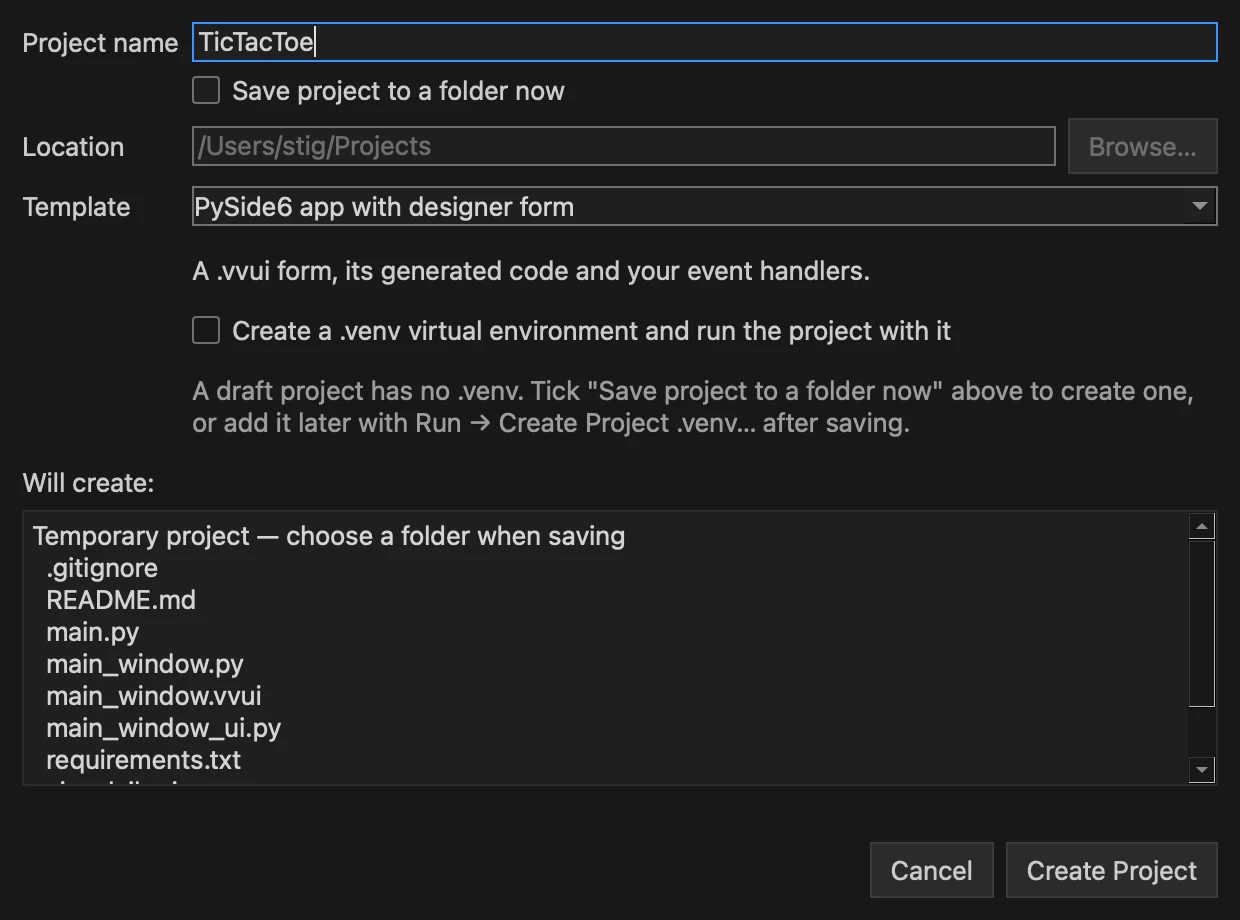
File → New Project has four templates: an empty app, a command-line tool, a PySide6 window, and a PySide6 app with a designer form. A project starts as a draft, so you can try things before you choose where to save it.
Draw the form
Drag buttons, lists, tables and other Qt controls from the Toolbox, set them up in Properties, and click Generate code. Your own code goes in a separate file that VisualVibe never overwrites.
Run it, then build it
Ctrl+F5 runs the program and F5 debugs it. When it works, Build → Build App packages it as a program that starts without Python.
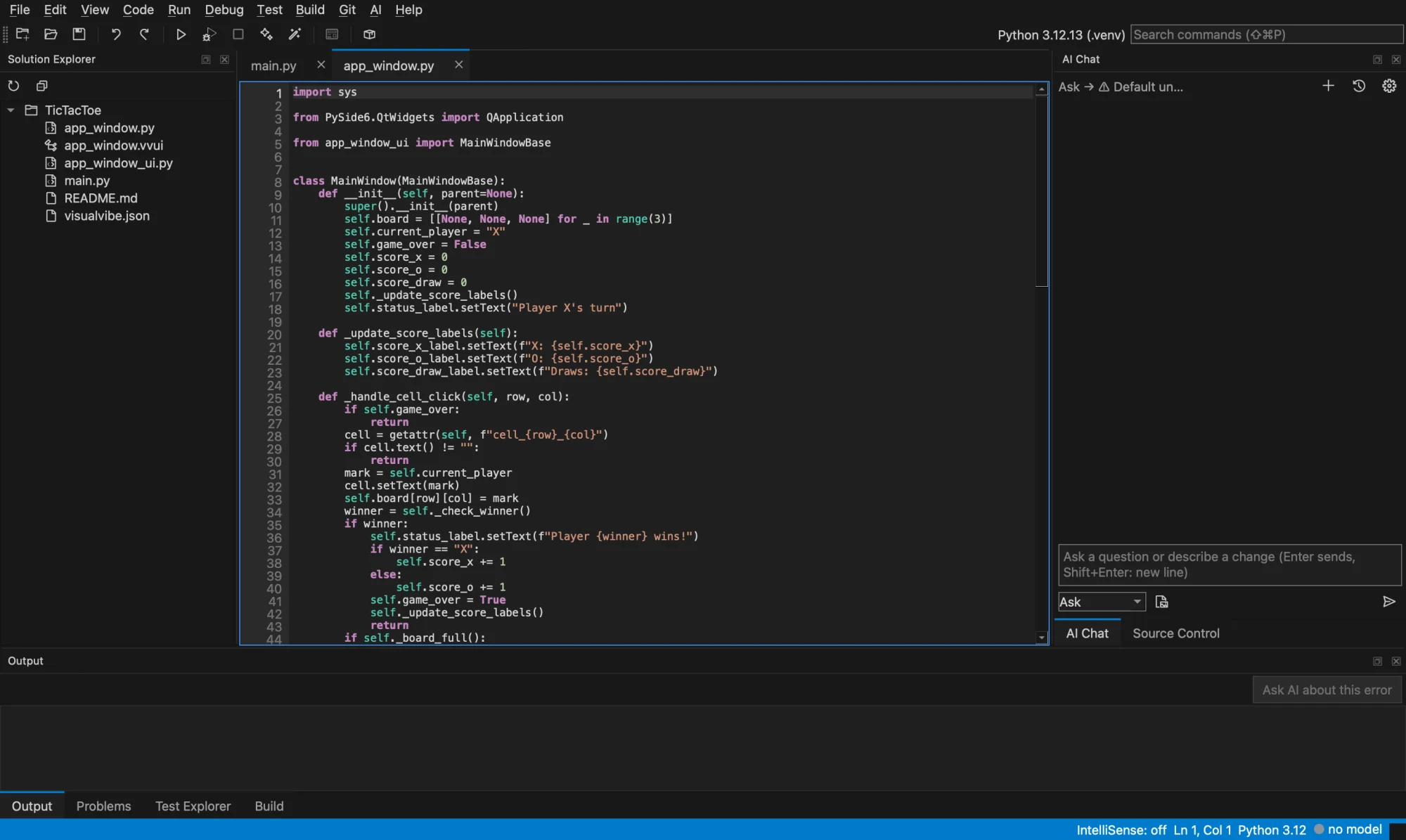
The parts you expect, laid out like Visual Studio.
If you have used Visual Studio, you know where things are, and the keys are the same: F9 sets a breakpoint, F5 starts, F10 and F11 step.
Editor
Tabs, find and replace, Find in Files, and Quick Open by file name. Ruff formats and checks the code, and problems get a Quick Fix.
Debugger
Breakpoints and stepping, with Locals, Watch and Call Stack panels for the paused program.
IntelliSense
Completion, parameter hints, Go to Definition, Find References and Rename, from a Python language server.
Tests and Git
A Test Explorer for the project's pytest tests, and a Source Control panel for diffs, staging and commits.
Terminal and environments
Real terminals in the project folder. Each project uses its own .venv or a Python you choose.
Crash recovery
Unsaved code and forms are kept in the background and offered back if VisualVibe closes unexpectedly.
One chat box, five ways to use your own model.
VisualVibe talks to a server you run: LM Studio, Ollama, vLLM or another OpenAI-compatible one, on this computer or your local network. It can search the network for servers, and you can give each mode its own model, for example a large one for chat and a small one for completion.
Nothing is written to your project until you have seen the change and accepted it.
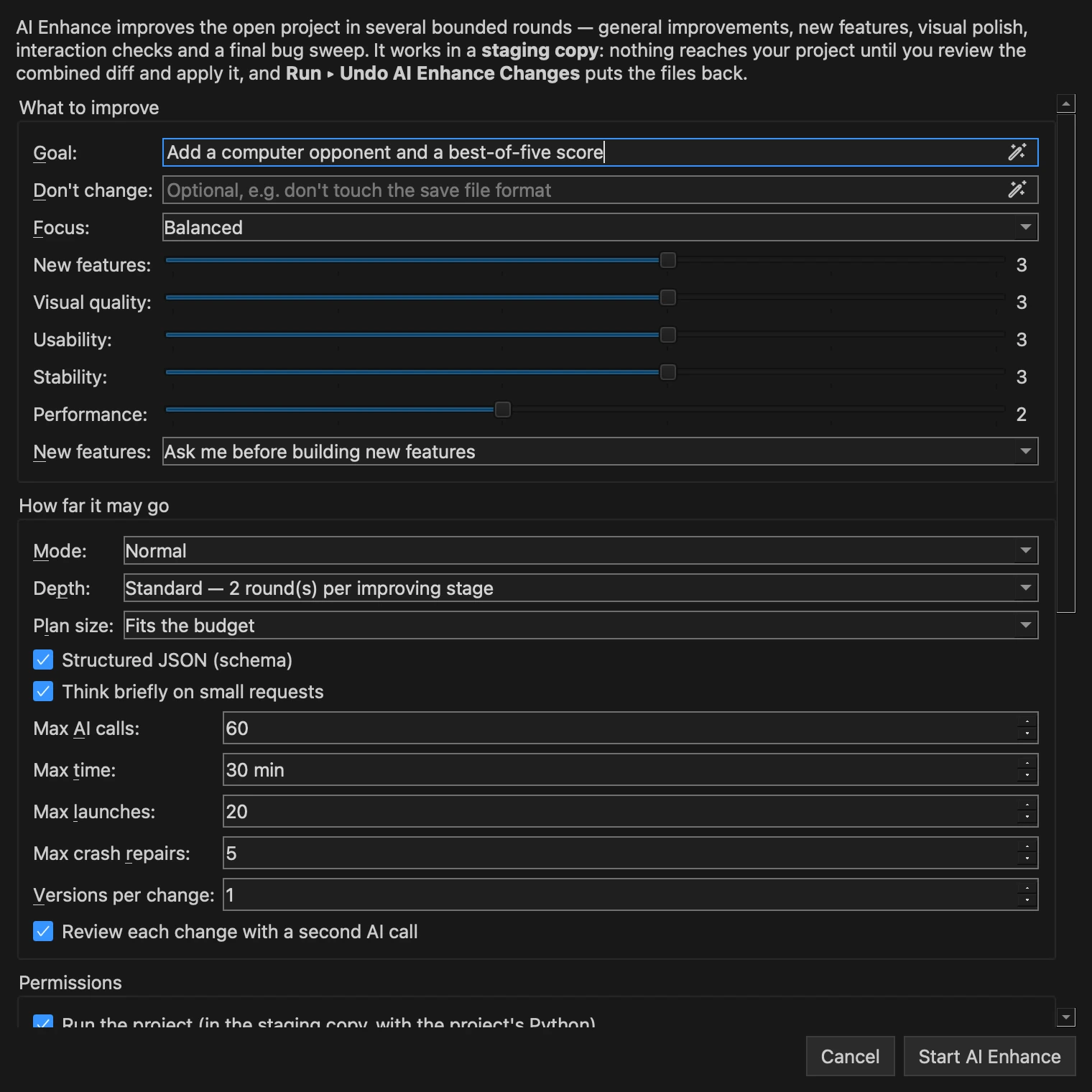
Give it a goal and let it work in rounds.
AI Enhance takes a project through a plan, improvements, new features, visual polish, tests and a bug sweep. You decide what it should focus on and how many AI calls and minutes it may use.
- It works in a copy of the project. Nothing reaches your files until you review the combined diff and apply it.
- Each change is checked, and the program is started and clicked through to see that it still works.
- New features are built only after you have approved the plan.
- Undo AI Enhance Changes puts the files back afterwards.
Your code stays on your machines.
- VisualVibe has no cloud service of its own. Requests go only to the model server you point it at.
- AI changes arrive as proposals: a diff to review, never a silent edit.
- API keys are stored in the operating system's keyring, not in the project.
- Saved AI chats are opt-in per project and kept outside the project folder.
Made with Claude, in early development, shared as is.
I made VisualVibe because I missed how easy it was to make a small program in Visual Basic: draw a window, double-click a button, write what it should do. I wanted that for Python, with help from the models I run at home. The code was written with Claude. It is early: file formats can still change, and it has only been tested on my own Mac. There is no warranty and no support promise. I use it myself, and if it is useful to you too, good.
What changed in each version.
Version 0.8.1
2026-11-07
Fixed
- Agent: reading a large file in parts no longer stops the run as a "repeated identical call". When an old result had been dropped from the request to save room, reading it again counted as a repeat although the agent had been told to read it again.
Version 0.8.0
2026-11-07
Added
- Agent effort: Agent mode in the AI Chat has an Effort box beside the mode (Quick, Standard, Thorough, Long run, kept between sessions). Quick caps a run at 20 replies with low thinking; Standard is the run as before (Max steps decides); Thorough and Long run have no step limit, may touch 40 or 80 files, keep more context per request and check their work against the task before finishing (one or up to three review passes; a review that changes nothing ends them).
- ✨ AI Enhance (#96–#105): a new action beside Run and Fix with AI (Run menu, toolbar, Ctrl+Alt+Shift+R) that takes an existing project through bounded, checked rounds — baseline, plan, general improvements, new features, visual polish, function tests, a bug sweep and a final verification — in a staging copy outside the project. Focus presets (Balanced, More Features, Visual Polish, Stability & Bug Fixes, Performance, Custom 0–5 weights) decide each stage's share of the AI calls; features are built only as approved. Every change is checked and the program run: an in-process harness clicks, types and presses keys inside the launched program only, captures its own window for a vision profile (opt-in per session) and tells a crash, a hang and a blocked environment apart. Results are reported honestly (static pass, launched, interaction verified, failed, unverified, blocked, manual). Changes reach the project only through Review & Apply, with a snapshot first and its own Undo AI Enhance Changes. Run and Fix with AI is unchanged. See docs/ai-enhance.md; demo projects in
examples/enhance_notesandexamples/enhance_snake. - AI Enhance quality and Extreme mode: changes can be built in several versions in parallel (different temperatures and approaches, each launched and scored) with a judge choosing the best; a separate reviewer call vetoes changes that are not better, break something or change what the program is; structured JSON (schema) answers; the whole project in the prompts; a measured score (stability, scenarios, looks, usability, startup and latency, accessibility, code health). Extreme mode runs plan → improve → test cycles for hours, keeps a cycle only when the score rises, grows the regression suite from every kept cycle, tidies up every third cycle, stops at a plateau, writes hourly progress reports, keeps the Mac awake, can be continued after a crash, and lets you apply the changes up to any kept cycle. New: the explorer (the vision model drives the program to find bugs), a seeded random-input crash hunt whose crashes become replay scenarios, extra screenshots (sizes, dark mode), per-project memory of rejected and failed ideas, streamed logprobs for confidence, a headless runner (
python -m visualvibe.enhance) andbenchmark/enhanceto measure AI Enhance itself.
Fixed
- AI Enhance builds a program from a new project and a goal ("a 3D maze game", "a budget app"). Before, the planner was told never to rewrite or convert the program and the reviewer kept it to the template ("a console script that prints a greeting; it has no GUI… must stay"), and the first change built was whatever ranked highest — a minimap before the game window existed. Now a template-sized project with a goal is built step by step on a foundation item (the window or game view), dependencies are built first even from a later stage, the goal's parts come before extras, and the identity describes what the goal asks for. See "Building a program from a new project" in docs/ai-enhance.md.
- AI Enhance on a new, empty project with no goal and "surprise me": the AI picks a small program to build (a game, toy or tool fitting the project's name) and builds it. Before, it decided the template "must remain a blank console placeholder" and added a shebang and coloured greeting.
- AI Enhance can test games: a scenario checks a painted game's own values (
state:level >= 2,len(bullets) >= 1;state_changed:angle). Before, a game's tests could only check that no error happened, and such a test counted as proof that a feature worked; now it no longer does. - AI Enhance: a kind of request (code, review, ranking, plan) that ran away once — thought to its token limit without an answer — asks for a medium reasoning effort for the rest of the session. In test sessions such runaways cost 4–7 minutes each, up to half of a session's time.
- AI Enhance: the visual stage looks at the window before building its planned items and fixes what it sees first; before, a small visual budget could end without the vision model ever seeing the window.
- Agent mode and AI Enhance: when the model stages a designer form whose events name handler methods the form's code file lacks, the tool's answer says which methods to add and where. Before, an AI Enhance change that added an Add button to a budget app's form crashed the program at start (
'MainWindow' object has no attribute 'on_add_button_clicked') and was thrown away. - AI Enhance: lint is counted per 100 lines in the code score. A procedural terrain explorer built from a 6-line template in extreme mode lost its whole first cycle because 8 style findings in 500 new lines dropped the code part from 10 to 8.4. Projects under 100 lines score as before.
- AI Enhance: the session never sends more pictures than its limit (a visual look counted only bytes), and one picture is kept for a rating; before, reviews could use them all and the final score lacked looks and usability.
- AI Enhance: the log says whether each change was kept or rolled back, and why; a session that ran out of time mid-cycle no longer reports stages as still running or pending.
- New Project: the greyed-out "Create a .venv" option now says why, in the dialog: a draft project has no .venv; tick "Save project to a folder now" to create one, or add it later with Run → Create Project .venv…. Before, only a tooltip explained it.
- AI Enhance: a cycle that turns a console program into a window program is no longer dropped because its new window can now be rated. The start (nothing to rate) scored 10, so any rating under 10 lowered the mean; three working cycles of a city builder were thrown away in a row. A cycle is now judged on the checks both versions have, and a check it made possible only refuses it when it rates the result below 4.
- AI Enhance Extreme mode on a local reasoning model (tested overnight with 20 generated games and apps): a cycle is kept when it adds *verified* progress (a new behaviour whose own test passes, a fixed crash) and the score holds, not only when the score rises — before, cycles with several working, reviewed features were thrown away because features do not move the score; a cycle the time cuts short is measured with what it kept (its untested changes get one batched test request) instead of being discarded, and the final verification always runs (a grace past the limit, cheap when late); normal sessions stop improving in time for it too. Ratings are anchored to the last kept window, a missing rating no longer inflates the score, startup jitter no longer costs performance points, an unchanged program keeps its baseline score, baseline checks must pass twice (random game states made them flaky) and a regression is re-run before it counts. Short structured requests (scenarios, ratings, explorer steps) ask for a low reasoning effort — about a quarter of the tokens; requests may take 30 minutes, while per-kind output budgets end runaway answers; a looping answer is asked again with little thinking instead of ending the session; a slow version is stopped once another one passed; a confident judge ranking replaces the separate review; cycles try three changes per stage and skip the plan while ideas wait, so they are tested and kept within the hour. Planning folds small tweaks into items a user notices. Normal sessions with screenshots rate looks and usability too. New
--ai-logfor the command line. - AI Enhance on bigger projects and games: the test harness reads and captures a window whose code hides a Qt method (a view that stores
self.scene = GameScene()broke every check before); coding tasks get the project's files up front with limits sized to them, versions share a stage's calls instead of starving each other, an item that keeps running out of calls is set aside instead of eating every later cycle, and a harness that cannot read the window is reported plainly.
Version 0.7.0
2026-11-04
Added
- Run and Fix with AI after the agent applies a change (#90): the agent's and Build app's checks read the code but never run it, and in the benchmark three applied results whose logic passed had a window that crashed at start or on every repaint. The reply now ends with a Run and Fix with AI link (nothing runs until it is clicked); the Ask-AI-about-this-error flow it starts fixed each of those crashes in one round.
- Run → Include Window Capture in Run and Fix (#93, off by default): the program pictures its own window 2.5 s after it starts and when an error is raised, and the picture goes with the error to an AI profile that sees images, so a window that draws the wrong thing can be fixed too. Nothing else on the screen is captured, and the picture is deleted when the loop ends.
- A restartable benchmark campaign (
tools/benchmark, #80–#88): 102 ordered tasks run through the app's own AI flows against a real model server — the #67 harness, 22 failure and recovery scenarios, five applications, four games, an existing app, Build app and a 20-step long session — each judged by automated checks (logic assertions and an offscreen start of the GUI). It keeps a checkpoint per task, so a stopped run continues where it stopped without applying anything twice; proposals are applied only after approval (or, with--approve benchmark, only inside the run's own folders). The results, failures, gaps and the roadmap are inbenchmark/. tools/make_source_app.pymakesbuild/VisualVibe.appon macOS: a launcher that runs VisualVibe from this checkout under its own name and icon. Run from source withpython -m visualvibe, the Dock showed the Python executable ("python3.12"), which a running app cannot change; the launcher holds a copy of the.venv's Python and links its site-packages, so code changes take effect at the next start without rebuilding.- Apply… puts a snippet where it belongs. It used to accept only a complete file, and Insert pastes at the cursor. A code block of an answer that is only part of the file now goes in only where its place is certain: the code the answer quotes ("replace this with that"), complete functions and methods the file has (by name, never an excerpt that shows only the new lines), or the one clearly most similar run of lines (never for a definition). The result must parse and pass the checks. Otherwise the AI is asked to put the change in (an Edit file request with what the answer said, which keeps an earlier applied block and the message box's text). Every way ends in the diff review and one Undo step. Files up to 100,000 characters that parse are now edited by definitions instead of only the function at the cursor.
- Apply answer… above an answer's code blocks (two or more Python ones): the AI puts the change the answer recommends into the open file as one proposal, leaving out alternatives and diagnostic steps, and you review it once. The chat shows a short line for such requests instead of the whole request, and Ask answers now give a change to the open file as one block with the complete changed functions instead of many fragments.
- Run → Run and Fix with AI (Cmd+Option+R / Ctrl+Alt+R, and a toolbar button): runs the project; when it fails, the error goes to the AI as with Ask AI about an error, the fix is written into the files and the project runs again, until it works (10 s without an error, or a clean exit), after 5 fixes, when the same error comes back, or when you click Stop Auto Fix. A missing library pauses it for the usual Install question. The chat lists what each fix changed, and Run → Undo Auto Fix Changes puts every changed file back in one step.
- Copy icons in the AI Chat: every code block of a reply has a copy icon in its corner (a check mark confirms the copy), and commands a reply writes inline, such as
python main.py, are listed under it with their own copy icon. - Installing missing libraries, always after asking: Install PyOpenGL… in the Output panel when a run stops with
No module named 'OpenGL'; a question when applied AI code (Edit file, Apply…, Insert, the agent) imports a library the project's environment lacks; Install… beside an answer'spip install. It maps import names to packages where they differ (OpenGL→ PyOpenGL,cv2→ opencv-python,PIL→ Pillow…), runs only<the project's python> -m pip install <packages>from checked package names, offers to create a project.venvfirst when there is none, and adds the packages torequirements.txt. - Checks of AI code, after VibeBasic's lessons with small local models: a proposed edit, error fix, staged agent file or Build app controller is checked for names that are never imported or defined (with the import to add, or *"Did you mean total?"*), Qt names imported from the wrong module or removed in Qt 6, calls with the wrong number of arguments or an unknown keyword, functions defined twice, and, in a form's code file, misspelt controls and missing or mismatched event handlers. Only problems the answer added count, and each quotes its line. They go back to the AI in its one repair round (the agent gets them with the tool result); a repair that is worse than the first answer loses to it, and what is still found is listed in the review.
- Ask AI about an error fixes get the same repair round as Propose Edit.
- Large files are edited by definitions: from 8,000 characters the AI returns only the functions, classes and methods it changes or adds, merged into the file by name; a stub it echoes back is never merged.
- Form proposals get a layout round: when the layout check finds new problems in a usable proposal (for Improve Layout: any left), they go back to the AI once, with a picture of the proposal when the request had the form image. A worse correction loses to the first proposal.
- The form prompt has a worked example using every op and a few layout rules; clear slips are accepted instead of costing the repair round: signals, child controls and properties given inside an
add,typeforkind,1/0for booleans and numbers written as text. - An excerpt of a large file now also carries, in full, the methods the current one calls and the definitions the request names.
- The code prompts carry short PySide6 notes (QAction is in QtGui, Signal not pyqtSignal, scoped enums…).
- The live evaluation (
tools/ai_eval) sends the same follow-up rounds as the app, judges the answer the app would show and has five harder tasks.
Changed
- The agent builds the whole thing for a short request. Its prompt said "use few steps", so "make a tetris game" gave a minimal single-file game. It now asks for a complete program with the features such a program usually has, split into files, and a final message that lists what was built; a change to an existing program is made in full but leaves unrelated code alone. Measured on a local model at Thinking Low: Tetris went from 403 to 785 lines (13 to 15 of 17 typical features), an RTS game from 597 to 1,740 lines (9 to 15 of 16), and "make all the pieces blue" still changed only 12 lines. Build app and Edit file ask for the full change too.
- Output budget is Auto by default: it asks the server for the model's limit (vLLM's
max_model_len, Ollama's and LM Studio's context length) on Discover Models, Test Model and Test Connection, saves it with the profile and uses it as the budget and as the box's maximum. A number you set still wins; the note beside the box says which ("Auto: 262144 tokens, from the server" or "Set by you · server limit 262144"). When the server reports nothing, Auto is 32,768 tokens as before. A profile saved by 0.6.1 with the old default (32,768) is read as Auto; any other saved value is kept. Each request still lowers the budget to what the context leaves after the prompt. - Agent → Max steps is Unlimited by default (0 in the box): an agent run goes on until the model gives its final answer, you press Stop, it repeats the same call or sends unusable replies. Unlimited also lifts the run's total token and size caps; a number you set keeps them. Max steps is saved under a new key: an old saved 12 (the previous default, which the old dialog always saved) is read as Unlimited, any other old value is kept. An Unlimited run stops after 40 tool calls in a row that stage nothing, and agent replies use the profile's output budget instead of a fixed 8,192 tokens.
- New app icon in the style of its siblings FuCode and FuMesh: a glossy, bevelled violet rounded square with an embossed white "vV".
tools/make_icon.pydraws it with PySide6 alone.
Fixed
- Calls that no form of a Qt method takes passed every check and failed when they ran:
painter.drawText(x, y, text, Qt.AlignmentFlag.AlignCenter)raised TypeError on every repaint of a generated Snake game. The library check (api_check) now compares the arguments of calls on PySide6 objects with the method's overloads and lists them, so the repair round fixes the call (#91; benchmark: 2/2 runs fixed, was 0/3). It stays silent when it cannot tell, and found nothing in the other generated projects. - An error raised in a Qt override was not seen: PySide6 prints "Error calling Python override of QLabel::paintEvent(): Traceback (most recent call last):" on one line, so Run and Fix with AI and Ask AI about this error missed it, and Run and Fix called a game that failed on every repaint "working".
- The agent wrote a new project into a sub-folder named like the project. Told only "Project folder: finance", the model created
finance/finance.pyandfinance/main.pyin the empty project folder, so nothing at the root ran (2 of the benchmark's 10 new projects). The task now says that paths are relative to the project root and lists a small project's files, including data files the outline leaves out, and a new file in a new folder with the project's own name gets a note to put it at the root if that was meant. item = list.addItem(text)passed every check, and the program crashed at start:addItem(text)returns None in Qt. The static checks now report that (andaddWidget,addLayout,addRowused the same way), so the repair round fixes it, and the PySide6 notes say it.- On macOS a LAN model server that the app is not allowed to reach (Privacy & Security → Local Network) only timed out with "is the server running?". For a private address the message now names that setting.
- An error fix could swap one crash for another: told not to "make the error go away with a dummy value", the AI answered
average([])withraise ValueError(...)instead of returning 0.0, so the program still crashed. The fix request now asks for a program that runs past the error, counts a sensible result as a real fix and calls an uncaught new exception a moved crash (live: the zero-division task went from 0/3 to 6/6). - A file too large to send whole that no longer parses (an
IndentationError, say) could not be fixed: Run and Fix with AI stopped with "no file of the project can be fixed" and Ask AI about the error gave an explanation only. The fix now replaces the lines around the error (from the line the message names). - When Propose Edit sent only the function at the cursor of a large file and the AI answered with the whole file, that file was put in place of the function, leaving the old file around a complete new copy. Such an answer is now recognised and reviewed as the whole file.
- Saving a temporary project that had a
.venvfailed with "A temporary .venv cannot be relocated" (Install's Create .venv and Install made one inside it). Install now saves a temporary project first, as Create Project .venv does, and a temporary project that has a.venvis saved without it: a virtual environment cannot move, so VisualVibe offers a new.venvin the saved project withrequirements.txtinstalled. - Ask AI about an error always offers a fix to apply when there is one: a file too large to rewrite gets its fix as the changed functions and methods, merged by name (before: explanation only), and an answer written as "replace this with that" becomes the whole fixed file for review. Other code that cannot be applied as it is gets one request for the fix in a form that can.
- Installing a missing library for an import VisualVibe does not know asks the AI which package provides it (Panda3D's
directwas offered as PyPI's unrelated "direct"), and Panda3D's modules are in the table. Nothing is installed when the project's environment already has the module (the program ran with another Python), and after an install VisualVibe checks that Python now finds it. - Found by having the AI vibe-code ten games end to end and running them: - a fix that rewrites a
from module import (...)line replaces the old line (the old one kept a name the library does not have); methods written without their class line or indentation merge into their class; a fix split over several code blocks is merged as one; - Ask AI about an error tells the AI what the project's Python really has: its version, the installed versions of the libraries the file imports (pyglet 1 and 2 code differ), and for "cannot import name X" the close names the module does have. It runs isolated, so none of the project's files run; - the library names AI code uses are checked against the libraries installed in the project's Python (from module import Name,Name.attribute, and the methods of a variable made by calling an imported class): a name the library does not have goes back to the AI in its repair round with the names it does have (Fog.setFogMode→ setMode, setLinearRange…). Edit file, error fixes and the agent's staged files are checked; the check runs isolated, so none of the project's files run; - for an error, the AI also learns the real methods of a class an object lacks a method on, and the installed signature of a method called with the wrong arguments; - the agent is told which Python the project runs with; - a package that cannot be installed (pygame had no wheel for Python 3.14) offers its drop-in replacement (pygame-ce) or says why it likely failed; - a standard-library module the Python lacks (Ubuntu's system Python has no tkinter) gets an explanation of how to get it instead of apip installthat cannot work. - Run from source on macOS, the menu bar showed "Python" as the application's name; it shows VisualVibe now (the Dock still names the Python executable; the packaged app is named VisualVibe everywhere).
Older versions
0.6.0 to 0.6.1
Version 0.6.1
2026-11-01
Fixed
- Startup is about 50 ms faster: toolbar and panel icons are drawn from the Codicon font alone instead of loading qtawesome and all 12 of its fonts; they look exactly the same (#60).
- The accessibility audit (
tools/a11y_audit.py) follows Qt's Tab rules: with macOS Keyboard navigation off only text fields and lists are Tab stops, and an exclusive radio group is one stop. Its tests now pass on macOS too (#22). - On Linux (Noto Sans) the AI Settings Server tab no longer cuts off the second line of its note; the layout audit now checks a spin box's field against its longest value instead of a free line edit's minimum (#22).
- Servers on Tailscale (100.64.0.0/10 addresses and
*.ts.netnames) count as the local network: they can be used with plainhttp://like a LAN server. Before, a server found by the Tailscale search was refused by Ask (#22, #68). - The AI Settings Vision note no longer cuts off its first and last lines, and Discard All in crash recovery asks with a Delete All button instead of macOS's "Don't Save" (#22).
- Find in Files opens with room for results below its fields also with larger fonts (Linux), instead of a fixed height sized for small ones (#22).
- The test suite no longer hangs or crashes now and then: its wait for an active window kept the GIL while an old window's thread pool waited for a Python job, and
ProjectTreeView.items()left persistent indexes for the garbage collector, which crashed Qt when it ran during a row insert.
Version 0.6.0
2026-10-27
The first tagged release. Nothing was tagged or published before; the source said 0.1.0 and later 0.3.0 during development. This version holds everything from the MVP through the v0.6 phase of the roadmap (the 0.3.0 entries were never released and are included here). Only macOS on Apple Silicon has been tested; Windows, Intel Macs and Linux are targets, not tested yet (#4, #22). Builds are unsigned.
Added
- LAN search through Tailscale: Search LAN… can include Tailscale devices (off by default). It reads
tailscale status --jsonread-only and checks this computer and each online device in 100.64.0.0/10 as a single host with longer timeouts, never sweeping the range. A missing, stopped or logged-out Tailscale is reported and leaves the LAN search unchanged (#68). - Live AI evaluation:
tools/ai_eval/harness.pymeasures 20 Ask, Edit, Error and Form tasks against a configured server (LIVE_BASE_URL,LIVE_MODEL) at low and medium thinking, judged automatically, with a pass-rate report, JSONL without the server address and re-judging; opt-in, never part ofpytest(#67). - Scoped edits: Propose Edit changes only the selected lines, or the function at the cursor in files over 30,000 characters, so large files can be edited; the AI answers with just that part (#69).
- Repair round: a Propose Edit answer with a syntax error is sent back once with the failing line and Python's message; the second answer is reviewed only if it compiles (#69).
- Reference images: Ask and Edit file take up to 2 reference images (PNG, JPEG or WebP, 5 MiB each, scaled to 1600 px), sent to models that see images; images that could not be sent are named in the chat (#69).
- Error fixes: Ask AI about an error asks the model to handle the actual failing value instead of hiding the error, and while the debugger is paused on the uncaught exception it sends the failing line's values (clipped and redacted) (#69).
- AI output budget: each profile has an Output budget (default 32,768 tokens) that is sent as
max_tokenswith every chat, edit, error and form request. It is lowered to fit the model's context when Discover Models reports it. Thinking gainsxhigh, and new profiles start at medium instead of the server default, which can be the slowest level (#62). - Thinking levels: when a server rejects the chosen thinking level and lists the ones it offers (vLLM/Qwen, OpenAI), the request is retried at the nearest offered level, and later requests use it straight away. Test Model shows the offered levels (#63).
- AI log details: each entry records the kind of failure, HTTP status,
finish_reason, the thinking level andmax_tokenssent, thinking tokens and request IDs (anX-Client-Request-Idheader is sent and the server'sx-request-idkept); Copy Metadata copies an entry without any prompt or answer text (#65). - Loop recovery: a chat answer stuck in a repetition loop is asked once more with a nudge and a mild
presence_penalty(without the form image and JSON mode), and repeated blocks of up to ~800 characters, such as form JSON ops, are now caught (#66). - Temporary projects: new projects start as working copies for experimenting. Ctrl+S saves the complete project to a chosen folder; quitting or switching offers Save / Discard / Cancel. Immediate saving remains available at creation.
- API keys: paste and save a key directly under AI Settings → Profiles. Keys are remembered locally in the system keyring, with per-server isolation and Save key / Remove key controls.
- Changelog: Help → About VisualVibe → Changelog shows a scrollable release history, included with the app and available offline.
- Designer window preview: forms show their title bar, icon and minimize/maximize/close controls while preserving the form's client dimensions and control coordinates (#46).
- Projects: File → New Project with four templates (empty app, CLI tool, PySide6 window, PySide6 app with a designer form) and an optional
.venv(#25); a portablevisualvibe.jsonwith relative paths only; a Solution Explorer; the last project and its open tabs come back on start. - Python environments: each project uses its own
.venvor a chosen system Python, shown in the status bar; VisualVibe can create the.venvand installrequirements.txtafter you confirm (#7). - Editor: one tab per file, line numbers, find/replace, Go to Line, Python indentation, UTF-8 and line-ending preservation, a warning when a file changed on disk (#6, #8).
- Run: run the open file in the project's environment with streamed output; Stop never freezes the IDE (#6).
- Ruff: format the document or a selection (optionally on save), background linting, a Problems panel and Quick Fix (#28).
- IntelliSense: completion, parameter hints, hover, Go to Definition, Find References and Rename through a Python language server (basedpyright, Pyright or python-lsp-server) (#26).
- Debugger: breakpoints, F5/F10/F11/Shift+F11 stepping and Locals, Watch, Call Stack and Breakpoints panels, with debugpy in the project's environment (#27).
- Test Explorer: find and run the project's pytest tests, with links to failures (#31).
- Source Control: status, diffs, staging, commits, branches and conflicts with the installed Git (#33).
- Build App: package the user's project with PyInstaller into a
.exe, a macOS.appor a Linux folder and.tar.gz(#30). - Crash recovery: unsaved code and forms are kept in the background and offered back after a crash (#32).
- Visual designer: drag-and-drop forms with a Properties window and undo/redo (#10); a versioned
.vvuiformat (now format 3) with Qt layouts, nested containers and migration of older files (#11); 16 Qt widgets (#12); events wired to handlers in a user file that is never overwritten, next to regenerated<form>_ui.pycode (#13); Preview Form (#29); several forms open as tabs. - Local AI: connect to LM Studio, Ollama or vLLM (or any OpenAI-compatible server, also found by a LAN search) and detect what the model supports (#14); streaming with Stop, reasoning, timeouts, token counts and retries (#15).
- AI editing you review: proposed edits are syntax-checked and shown as a diff, applied as one undo step and refused if the file changed meanwhile (#16); project context, a symbol index and prefix-stable prompts for local models (#17); Ask AI about an error's traceback (#19); inline ghost-text suggestions and code actions (#34).
- AI for forms and projects: the AI designs or improves a form through validated JSON operations with a before/after review (#18); an opt-in vision check of the form's layout (#35); a controlled agent for multi-file changes with review, snapshots and undo (#20).
- AI Chat panel: one message box with Ask (remembers the last few turns), Edit file, Agent and Design form modes; code blocks can be inserted, saved or applied.
- Platform conventions: each OS's shortcuts and file dialogs, windows that fit small and HiDPI screens, a layout audit tool, and Help → System Information (also
python -m visualvibe --system-info) for bug reports (#22, still open for Windows and Linux checks). - Packaging the IDE:
python packaging/build.pybuilds VisualVibe itself on macOS, Windows or Linux, unsigned unless a signing identity is given (#23). - Release process: one version source, this changelog,
docs/release-checklist.mdandtools/release.py(version check, SHA256, release notes); the Windows build gets a version resource (#42). - Tests: a headless, offline pytest suite with Qt offscreen and a manual checklist and platform matrix instead of CI (#5, #21).
Changed
- A Visual Studio 2022-style look: dark (default), light or system theme, Codicons, an icon toolbar with a command search box, one tab strip for code and forms, Toolbox beside the Solution Explorer, categorized Properties and a coloured status bar (branch, line/column, Python, AI model).
- The default test run is parallel and skips slow real-tool tests (
pytest -m ""runs everything). - README rewritten with a user guide (#24).
Removed
- The GitHub Actions workflow: no runners are available, so every check runs locally.
Fixed
- Choosing a server in the LAN search (Use Server or double-click) puts it on the Server tab and discovers its models; a default profile that holds an API key still keeps it and gets a separate profile.
- AI requests, including each automatic inline completion, no longer write five settings keys every time or read the system keyring for every request: the ⚙ fields are saved when they change and a saved key is read once per session (#61).
- Saving a long AI chat no longer makes the window hitch at the end of every reply: only the new messages are checked for secrets, and the file is written in the background (written before the window closes) (#55).
- Typing in the Chat History search box no longer stalls: it searches once typing pauses, on a background thread, and only re-reads chats that changed since the last search (#58).
- A
.vvuifile with an infinite, NaN or non-numeric size or position is reported as an invalid form, also at startup, instead of raising an uncaught OverflowError (#51). - Saving code, forms, generated
_ui.pyfiles, project files and rename edits to closed files is atomic: a crash or full disk leaves the old file instead of a truncated one. Permissions and line endings are kept, and read-only files or (on Windows) files locked by another program get a clear error (#52). - When New Project fails after you choose Discard for the temporary project, the error is shown and the temporary project stays open and current instead of being left behind as a discarded folder (#53).
- Messages point at the current menus: AI ▸ History ▸ Undo Last Agent Changes, and AI Settings ▸ Server for inline completion (#54).
- Saving an existing file no longer makes the AI index walk and sort the whole project again; Save As and new files still do, and listing the project is faster with the same order (#57).
- Problems and Source Control keep their lists when a lint or the repository status reports the same result again, and typing no longer re-applies every editor highlight layer on each keystroke (#61).
- Applying a theme reuses the tab close and check box images already in the cache instead of rendering them again at every start and theme switch (#60).
- Build App opens at once and shows "Checking PyInstaller…" while the interpreter is asked on a background thread; the size of a finished build is measured there too, so a slow interpreter or a large bundle no longer freezes the window (#59).
- Print-heavy programs no longer slow down in the Output panel or keep the window busy: output is collected and inserted every 40 ms, and the oldest lines over the cap are dropped in one step (#56).
- A rejected thinking level no longer drops thinking control, streamed usage and JSON output for the rest of the session; a rejection that names one field drops only that field first (#63).
- Discarded temporary projects are removed at exit again; the language server no longer marks them as used by running programs (#48).
- Build App revisions send the request, the revision instructions and the current design and controller once, instead of every earlier version, and a revision after a failed one starts from the last complete proposal (#49).
- Agent mode checks staged designer forms before review, and Apply All finishes and says which form could not be reloaded instead of stopping with an error (#50).
- AI answers are judged strictly: an unreadable stream chunk, a missing finish reason, a tool call or a content-filter stop is reported instead of being treated as finished. Hitting the output limit just before the connection drops says so, and the message names thinking rather than the context window (#64).
- On macOS, the AI Chat message box starts at its correct height instead of 2 px short until text changed (#22).
- Missing event handlers in form previews now report the actual function name instead of
{handler}. - Windows Python launches use VisualVibe's taskbar icon and associate with its shortcuts (#45).
- Format on Save keeps the interface responsive, offers Save without Formatting when slow, and preserves edits on cancellation, timeout or stale results. Windows prefers native Ruff (#47).
- AI edits can no longer overwrite a file that changed since the proposal (#16).
- Enter in a popup no longer runs the program twice; Save and Save As act on the active document, also on form tabs; recovery follows form tabs as they open and close.