
Wattbar 1.6 is out. The panel can now show how warm your Mac is and how fast its fans spin, and Wattbar can check whether a newer version is out. There are also a few fixes to the panel and the right-click menu.
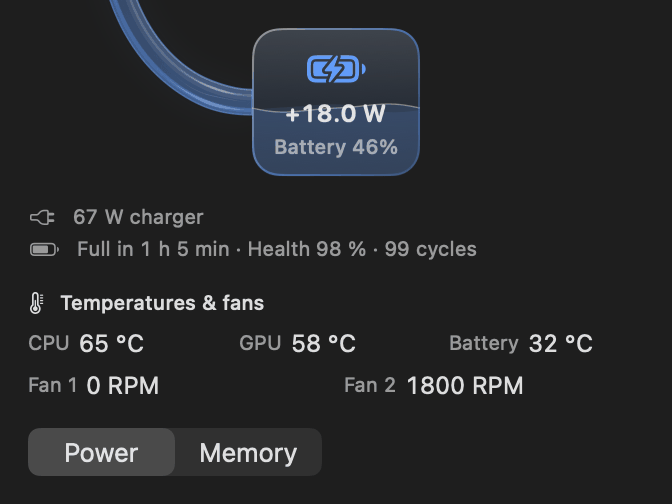
Temperatures and fans
Turn on Show temperatures or Show fan speeds in Settings → General, and the panel shows the CPU, GPU and battery temperatures in °C and each fan’s actual speed. The temperatures share one row and the fans another, so the panel only grows a little. Both are off by default, and each works on its own.
Wattbar only shows what your Mac reports. A fan that has stopped reads 0 RPM, and a sensor the Mac doesn’t have says Unavailable rather than showing a made-up number. When neither is switched on, Wattbar doesn’t read the sensors at all.
Check for updates
Also in Settings → General: Check for updates…. Wattbar asks stigern.net for the latest version only when you click it, and if there is a newer one, opens the download page in your browser. There are still no automatic checks, no account and no analytics.
Fixes
- The panel keeps its size as new readings come in, and opens at the same size next time. On smaller screens it still scrolls.
- The right-click menu puts each group of CPU cores on its own line, and its rows no longer jump around while the numbers update.
- Opening the panel or Settings cancels a right-click menu that was about to open, so it can’t pop up on top of them.
- The water in the power-flow tubes and the battery card moves more gently. It still stops when the panel is hidden, and with Reduce motion on.
The full list is in the changelog on the page.
Get it
Version 1.6 is free, for Apple silicon Macs with macOS 13 or later, signed and notarized by Apple. If you already have 1.5, download 1.6 from the page; from now on, Check for updates… will tell you about new versions. Get it here!